

Crafted Call

Product announcements

Product Announcements from Crafted Call.

Follow new launches, feature expansions, and product thinking for call for artists software, jury review, exhibitions, gallery websites, email marketing, artwork sales, and more.

Latest update
October 22, 2026
Written for
Gallery teams
Includes
Launches, expansions, quality
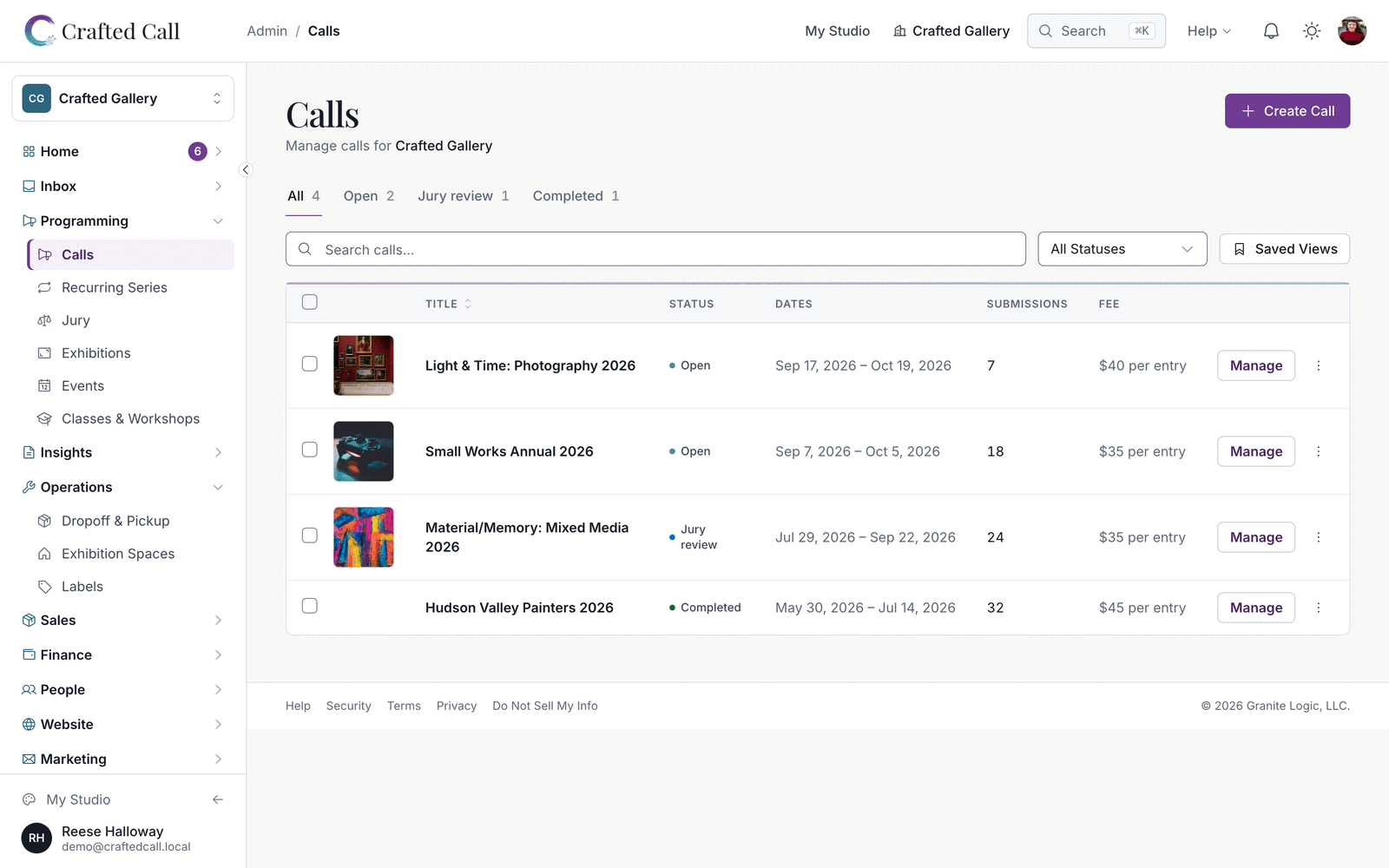
Crafted Call calls dashboard showing call statuses, submission counts, deadlines, and quick actions.

Page 5 of 13. Back to the latest announcements

Product announcement

Share unlisted calls by link, ask artists for PDF uploads, and stay signed in while you work

Share a call by its link without listing it, ask for a PDF as one of your call's questions, and lay out a call with its own images and content blocks. An expired session signs you back in right where you are, and jurors land straight on their next review.

LaunchedCall admins

Share a call by link without listing it

Choose Unlisted on a call's visibility setting and anyone with the link can read the call and submit, while the call stays out of the calls directory, search results, recommendations and search engines. It suits a members-only call you announce on your own site. Private calls still work as before for invitation-only calls.

LaunchedCall admins

Ask for a PDF as one of your questions

A call's questions can now include a PDF upload, such as a proposal, a bio or a set of work samples, up to 20 MB each. Reviewers open the file from the submission, and submission exports carry a link to each one. Files are kept private and removed when the submission is deleted.

LaunchedCall admins

Add images and content blocks to your call

Call descriptions, guidelines, requirements and eligibility can now include images you upload to the call. Between questions you can place a content block, such as a floor plan or a price chart, that artists read while they fill in the form. Artists also see the call's guidelines while they prepare their submission.

ExpandedCall admins

Proposal calls talk about proposals

Application and membership calls now ask for a proposal where exhibition calls ask for artwork, from the form headings to the submission review screens. Every place that states your entry limit uses the same sentence, so artists read one rule instead of three.

ExpandedEveryone

Sign back in without losing your work

If your session expires while you are working, a sign-in prompt opens on the page you are on, and whatever you were saving goes through once you sign back in. Staying signed in now lasts 30.5 days, so a monthly routine no longer lands on a sign-in screen.

ExpandedJurors

Jurors land on their next review

A juror's account opens on the first review waiting for them, with navigation built for jurying, and invitations finish for new and existing jurors alike. The review screen keeps the artwork and the Yes, Maybe and No buttons together, with one-tap voting on a tablet or phone, and anonymous review keeps every identifying detail out of view.

QualityEveryone

Quality work across refunds, money and admin pages

Refunds the card network settles late finish on their own, every refund is issued exactly once, and accounting exports show what was refunded. Catalog sales use your organization's currency, and Australian galleries' fees read A$ for artists. Artists can finish paying inside a call's grace window, storefront checkout handles every artwork image, and exhibition follower announcements and volunteer notifications go out on time. Admin screens explain any problem in plain words, long lists load every row, switching organization updates the page at once, and the dashboard loads faster.

Product announcement

Print QR codes on gallery wall labels, record EU VAT numbers, and publish calls sooner

Label templates you design can print a QR code, EU organizations can record their own VAT number, and a call can go live before its description is written. Premier now includes custom reports, every plan-gated page names the plan it needs, and settings suggest your time zone, locale and units from your country.

LaunchedExhibition teams

Print QR codes from your own label templates

A label template you design can now include a QR code, and a new Wall 2-Up Grid starter gives you a ready-made wall label with one, two across on a US Letter sheet. New organizations start with it among their label templates. When you print labels for a call, the sheet prints the QR code your template asks for, and a piece with no year no longer leaves a stray comma.

LaunchedGallery admins in the EU

Record your EU VAT number

Organizations in the European Union can now record their own VAT number on the Sales Tax Settings page, so a sale to a VAT-registered business in another member state can take the reverse charge. A sale is zero-rated only when both VAT numbers belong to their own member state. Greek organizations now get a VAT calculation, and artists in Greece are offered VAT registration fields.

ExpandedCall admins

Activate a call before writing its description

A call can be activated before it has a description. The publish card shows one clear list of anything that would stop the call going live, such as a missing deadline, fee or Stripe connection, and keeps suggestions like a poster or description as optional extras below the button. A draft made in the guided wizard also saves from the edit screen before it has a description.

ExpandedEvent organizers

Events wait for the call they belong to

If you mark an event Active while its linked call is still a draft, the event is held and goes live the moment you publish the call, so an event never appears before its call. You can also set the cover image's focal point while creating an event, instead of saving first and adjusting it afterwards.

ExpandedGallery admins

Set your organization's clock, locale and units

Timezone, locale, paper size and measurement units are suggested from your organization's country and saved once you pick them, and the setup step asks you to confirm your country, currency and time zone. Until a time zone is set, the localization settings say which clock your deadlines, reminders and exhibition dates run on. Volunteer schedules and the activity feed show times on your organization's clock.

ExpandedGallery admins

A statement for every month that holds money

The monthly statement picker offers every month with money in it, so a month your accountant asks for is never missing from the list. Each statement names the currency it is in and the time zone its month was cut on.

NoteGallery owners

Premier now includes custom reports

Organizations on Premier can open the commission and inventory reports, and existing Premier organizations have them already. A page or feature card your plan does not include keeps its heading and names the lowest plan that unlocks it.

QualityEveryone

Quality work across submissions, admin pages and sales

Invited jurors sign up and start reviewing in one step, and a tab left open across a release refreshes itself. Old links to a call, event, collection or portfolio take visitors to the current page, your staff can add images and documents to an artist's submission, and an artist invited late can finish a submission started from a saved draft. The Social Media tab, notification settings and long admin lists show exactly what you saved, every portfolio card shows a cover image, and fee filters on the calls directory group amounts by currency. On a phone, the Ask Frida button and the cookie banner stay clear of the buttons beneath them, and dropdowns and upload buttons are readable in dark mode. Your plan is read from your billing record everywhere, so the pricing table, usage caps and feature gates always agree.

Product announcement

Clearer artist submissions, searchable billing history, and automatic alt text on your terms

Artists entering work are told exactly what to fix and where, and keep their work through a sign-in expiry or a second open tab. Administrators can search and export their billing history, and owners decide whether automatic alt text runs.

LaunchedGallery admins

Choose a not-for-sale default for new calls

Organization settings now let you choose whether new calls allow not-for-sale entries by default. Each call can still have its own setting, and existing calls keep theirs.

LaunchedArtists

Told exactly what to fix, and where

While you enter work, a problem now names the field and takes you to it. If your sign-in expires or the same submission is open in two tabs, you recover the save without losing what you typed, and leaving with unsaved work gives you a real choice. The review step shows exact prices with one clear fee line, lets you inspect every image and document, and edits straight from there. On a call, the list of your saved submissions says what each one still needs and takes you straight to it; one waiting on payment says so.

LaunchedGallery admins

Search and export your billing history

Organization administrators can review a plan change before it takes effect, pick up a checkout that was interrupted, and search or export the organization's complete billing history.

LaunchedGallery owners

Decide whether automatic alt text runs

Owners and administrators can turn automatic alt text for artwork images on or off in organization settings. The setting shows exactly what is sent to the model before you agree, and it starts off. If a generation is interrupted, the work and its cost are recovered rather than paid for twice.

ExpandedCall admins

Calls on your own date convention, series that keep their fees

For galleries outside the US, deadlines, opening dates and shared links on the public call page read in your organization's date convention rather than the American one. A recurring series created from a paid call carries its entry fee, currency and fee options onto every occurrence, a flat-fee call's public page shows the full price range across its entry cap, and every decision letter links the artist straight to their submission.

ExpandedCall admins

A clearer call workspace, and shows built from a call

The call poster sits beside the title, and a Manage submissions button opens the full workspace, which now shows submissions sooner and states collected payments, refunds, waivers and tiered entry fees. A show created from a call carries the call's poster and a public-facing description, and Regenerate from call fills them in on a show you already have. Artwork photos up to 50MB are accepted wherever you add a piece directly.

NoteGallery admins

API actions that move money use the finance scope

Creating or voiding an invoice, processing or retrying a payout, refunding an order, recording an expense or reimbursement, generating a 1099 and running Stripe reconciliation through the API use a key with the finance scope. Signing in through the browser is unaffected. If an integration of yours moves money, give its key the finance scope.

QualityEveryone

Quality work across uploads, payments and tax

Artists drag images into the order they want, a single failed file recovers on its own, and submission previews show the entire image. A submission counts only the images that finished uploading, so every paid entry arrives with its artwork, and a new support ticket reaches us the moment it arrives. Invoices can be due the same day, a discount code comes straight off the buyer's card, and Australian galleries get a tax invoice for every sale at or above A$1,000, made out to the customer as they were when they paid. Payouts, reports and schedules show for every connected Stripe account, and a price of zero stays zero everywhere.

Quality announcement

See plan prices in Australian and New Zealand dollars, and send one decision letter per artist

Galleries in Australia and New Zealand see plan prices estimated in their own currency, with new Help Center guides on localization, GST and email consent rules. Each artist receives exactly one decision letter whichever button sent it, and upload previews show the whole image.

LaunchedGallery owners

Plan prices estimated in Australian and New Zealand dollars

The home page now shows each plan's price estimated in your own currency when you visit from Australia or New Zealand, and says plainly that Crafted Call is available there. The Help Center gained guides to localization settings, Australian GST and ABN records, and the email consent rules that apply in each country.

QualityCall admins

One decision letter per artist, whichever button sent it

When you accept, decline or waitlist submissions with the accept-all action, each artist counts as notified the moment their letter is delivered, so Ready to Send leaves them out and the Send decision emails step skips them. Artists told before this release are marked as notified too.

QualityArtists

Upload previews show the whole image

The preview tile on the entry form and in the portfolio editor shows the whole image, edges and all, just as it is stored and as jurors see it.

Quality announcement

Download exhibition closeout records and occupant statements, with financial reports that match their exports

Exhibition closeout records and year-end occupant statements download as documents, and every financial report agrees with its own export. Deadlines and money read on your gallery's own clock and currency, and artists get clearer answers while they submit.

LaunchedGallery admins

Closeout records and occupant statements as documents

Two records that used to exist only on screen now download as documents. The exhibition closeout record, with its return-and-sale manifest, downloads from the closeout page, and a year-end occupant statement covering the period you have on screen downloads from the occupant's payment history. Nobody has to assemble either from a raw export again.

LaunchedExhibition teams

Print just the labels you select

The Print labels dialog now prints exactly the artworks you have selected, wall or back-of-artwork, with back labels ordered by artist last name and a preview of the run before you download. Staff can also reprint selected labels and check all of an artist's pieces in or out with a single confirmation email.

ExpandedGallery admins

Financial reports that agree with their exports

The payout report's net deducts refunds and conversion fees, the revenue report's breakdown adds up to its total, and website-shop sales appear on every monthly statement. Every report produces a file in PDF, Excel and JSON, prints on your organization's paper size, and tells you plainly when a file cannot be made. Negative amounts export as numbers, so refunds total correctly in spreadsheets.

ExpandedEveryone

Deadlines and money on your gallery's own clock and currency

The days-left figure now matches on a call's card, its page, search results, saved calls and reminder emails, and analytics charts count deadline-night activity on the right day. Galleries that price outside US dollars can create free calls, prizes and promo discounts show your own currency, and anything Crafted Call bills you is labelled in US dollars wherever it appears.

ExpandedJury teams

Jurying that keeps up with you

Triage voting responds the instant you press it, saves the note you typed alongside the vote, and counts each submission once, even on a double press. Jurors can revise their own scores while a round is open, the Calibration panel waits until three other jurors have voted before revealing the panel's scores, and every screen that says an artist has been notified now agrees with what was actually sent.

ExpandedArtists

Clearer answers while you submit

Artists can upload a full set of images to a submission in one go. If a session expires while an artist is filling in a form, it says so plainly and offers a sign-in that keeps everything typed. When jurying closes the edit window, the page explains why and who to contact, and if results go out early artists see the decision they were emailed.

NoteGallery admins

Lapsed subscriptions are priced on the free plan

An organization whose subscription has lapsed is now priced on the free plan everywhere, instead of keeping its former plan's activation fee, commission rate and platform fee. A paid call also refuses to open while the gallery's Stripe account cannot take the entry fee, so artists are never told a fee is due and then blocked at checkout.

QualityEveryone

Quality work across payments, email and exhibitions

Artists receive a refund confirmation email and the transaction page shows what was refunded. Artwork, posters and logos load in every email, and campaign sends include the class, workshop and artwork cards you added. Archived and canceled exhibitions show their real status, catalogues print in your own colours and typeface, and checkout from a gallery's own storefront completes on the gallery's site.