

Crafted Call

Product announcements

Product Announcements from Crafted Call.

Follow new launches, feature expansions, and product thinking for call for artists software, jury review, exhibitions, gallery websites, email marketing, artwork sales, and more.

Latest update
October 22, 2026
Written for
Gallery teams
Includes
Launches, expansions, quality
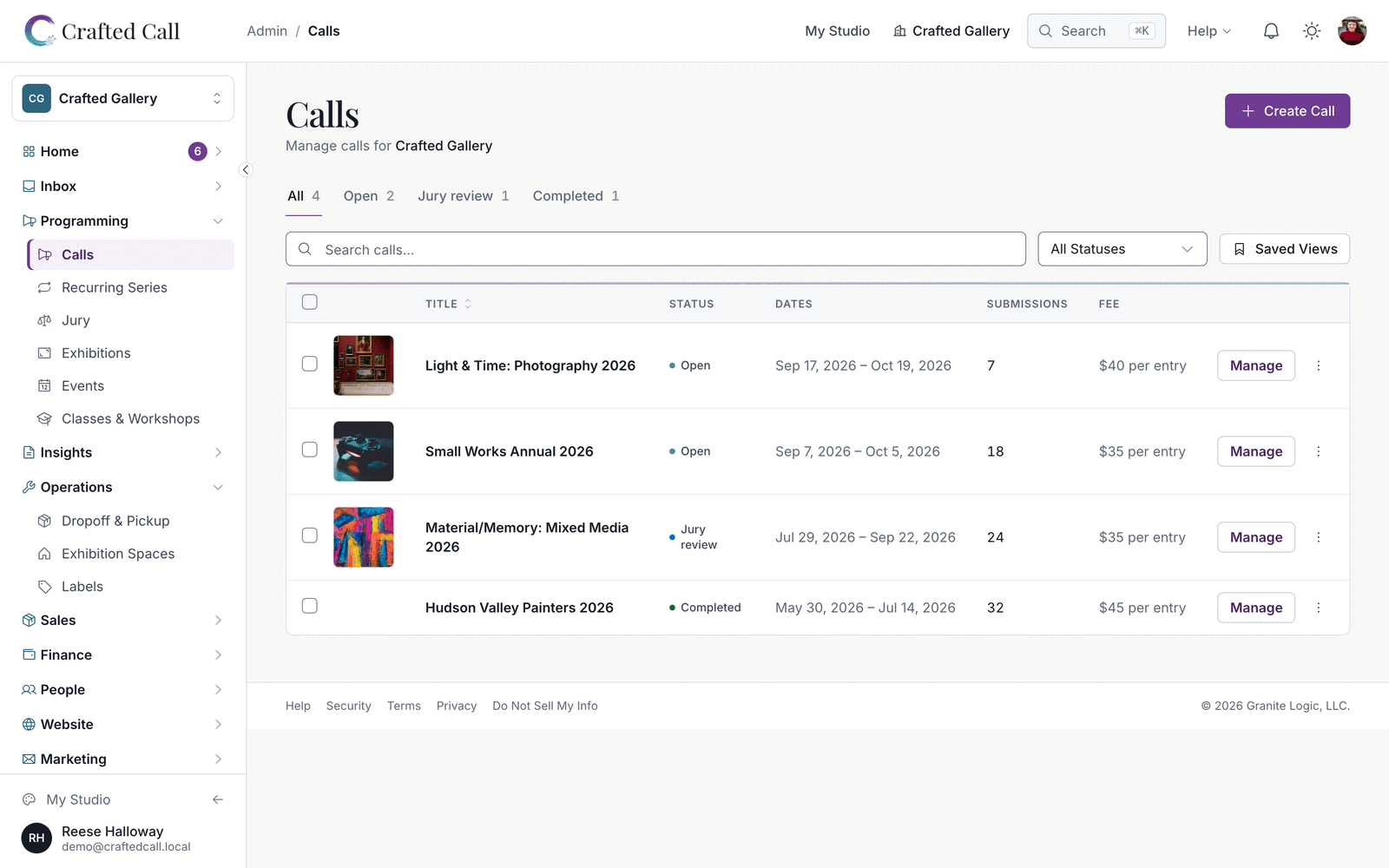
Crafted Call calls dashboard showing call statuses, submission counts, deadlines, and quick actions.
Product announcement

Make targeted campaign edits with Frida and restore earlier versions

Ask Frida to change one part of a campaign and see exactly what will change before you approve it, then compare or restore earlier versions. This release also brings clearer audience choices in the campaign editor, wall-label editing for every piece, better Accepted Works PDFs, a clearer status page, and quality work across calls, exhibitions, events and memberships.

LaunchedMarketing teams

Make targeted campaign edits with Frida

Frida can change one part of a campaign, such as a block's font or a button's link, without rewriting the whole email. The approval card says exactly what will change. Ask Frida what changed between saved versions, and restore an earlier version after you approve it.

ExpandedMarketing teams

See when Frida is still finishing an approved change

While an action you approved is still running, Send is paused and tells you why. Your typed message stays in the box, ready for you to send when the action finishes. If an approval card is still open, Frida says it is waiting for you rather than showing a second card.

ExpandedMarketing teams

Choose and exclude campaign audiences more clearly

A draft that goes to a fixed list says so and offers a Choose a different audience button. Segments you don't want to send to sit behind an Exclude segments toggle, so the recipient step lists your segments once. Content pickers find older events, classes, exhibitions and calls to feature.

ExpandedCall admins

Edit wall-label text for every piece in a submission

On Labels & Export Review, each piece in a multi-piece submission opens the same wall-label text editor as a single piece, with Fix with Frida, Reset to Original and Undo. Frida's Write One sticks to what the artist and your gallery have recorded. The artist statement page shows its thank-you message at the top on phones.

ExpandedCall admins

Print photos for imported calls in Accepted Works PDFs

The Accepted Works PDF prints the photos for calls imported from another platform. When submissions include more than one piece, the cover reads how many pieces came from how many submissions. The email that delivers the PDF says how long its download link lasts.

ExpandedEveryone

Follow platform status and incidents more clearly

The status page tells outages, scheduled maintenance and unavailable monitoring apart, and ongoing incidents stay visible until they are resolved. The page refreshes on its own, and you can follow incidents by RSS or contact support from it.

QualityEveryone

Quality work across calls, exhibitions, events and email

Duplicated coupons work at checkout, and call imports flag amounts in another currency and read dates in your gallery's time zone. Galleries over their plan's show limit can edit their public shows, and digital works show their watermarked preview. Accepted membership applications and waitlist promotions finish reliably, and campaign buttons in the editor match the color your email sends. This release also includes security and reliability improvements.

Product announcement

Customize waitlist letters for each call and send campaigns in your own fonts

Write a waitlist letter for a single call, let ticket holders come back for more tickets, and send campaigns that use the fonts and images you designed with. This release also brings clearer campaign planning, accurate exhibition details everywhere they appear, and quality work across calls, submissions and checkout.

LaunchedCall admins

Customize the waitlist letter for each call

Juried calls now have a Waitlisted Email tab next to the other decision letters. Change the subject or the message for that one call, and anything you leave alone keeps following your organization's letter. Preview it and send yourself a test copy before decisions go out.

ExpandedEvent organizers

Let ticket holders buy more tickets to your event

People who already have tickets to an event can come back and buy more. Each extra purchase is its own order, with its own receipt and its own refund if plans change.

ExpandedMarketing teams

Send campaigns in the fonts and images you chose

Font pickers show the font your campaign actually uses, including brand fonts like Roboto and EB Garamond. Fonts you choose for a text block, a button or a few words of text appear in the emails you send. Images placed inside your text load for every recipient.

ExpandedMarketing teams

Edit a draft campaign with Frida from its Setup page

Ask Frida for a change while you are on a draft campaign's Setup page and Frida edits that campaign directly. If a reply is cut off or you decline a change, Frida tells you plainly that nothing was changed.

QualityMarketing teams

Plan campaigns with clearer segments and send times

Segment summaries spell out every rule, and large segments recalculate without timing out. The campaign editor previews your Brand Kit accent color and logo, shows who a campaign excludes, and offers Phoenix and Mexico City as their own time zones. Saving a campaign as a template keeps all of its design settings, and each recipient receives a campaign email once.

QualityGallery admins

See the address your email is sent from

Email Settings shows the address your organization's email actually goes out from. If you send from your own verified domain, that is the address you see there.

QualityExhibition teams

Show the right images and artists for every exhibition

Website embeds and exhibition email cards use the image you chose for each work, and image lists you arrange stay in place when artists update their submissions. Catalog copy, closeout sheets and award wall labels name the real artist. Condition report PDFs carry long notes onto extra pages.

QualityEveryone

Quality work across calls, submissions and checkout

Call emails link to the right gallery's call page, award emails show prizes in the call's currency, and extending a deadline always wins over an automatic close. Copied submissions keep the details entered for each image. Buyers who back out of checkout can try again right away, and artists finishing a free Australian submission through a guest payment link reach their confirmation page. This release also includes security and reliability improvements.

Quality announcement

Design with Frida and prepare campaigns for sending

Add images while designing your campaign with Frida, then open sending setup when the design is ready. This release also improves subscription preferences, decision-letter records, checkout cancellation and payout preparation.

ExpandedMarketing teams

Design first, then prepare your campaign to send

Create with Frida keeps inbox details, recipients and sending controls out of the way while you design. Choose Prepare to send when you are ready, or return to designing to keep working on the email. You can add more images in the conversation and review the saved campaign before sending.

QualityMarketing teams

See the email’s layout more closely while designing

Images stay fully visible in the designer. The canvas follows your email’s spacing, fonts, colors and theme header settings more closely. A collapsed sidebar opens from any tool icon or its expand arrow, including on tablet screens.

QualityMarketing teams

Keep subscriber choices through imports and updates

Subscriber imports and preference updates preserve existing consent and choices that were not changed. Re-confirming a subscription records the new consent, while simultaneous confirmation and resend requests respect the latest saved choice.

QualityCall admins

Record waitlisted decision letters sent elsewhere

When you mark decision letters as sent outside Crafted Call, waitlisted artists are included alongside accepted and declined artists. Your notification records reflect the people you have already contacted.

QualityEvent organizers

Keep cancelled event registrations out of checkout

Cancelling an event registration closes its open checkout session after the cancellation is saved. A checkout already being prepared also checks the saved cancellation before returning a payable session.

QualityGallery admins

Prepare payouts and US tax forms with clearer details

Disputed sales stay on hold when payouts are prepared, and manual sales retain their currency. US 1099 preparation uses the payee’s legal name and mailing address, with readiness checks when information is incomplete.

Product announcement

Find every call action in one menu and write wall labels with Frida

Call Actions groups everything you can do with a call into four sections, with the next step for your call's stage one click away. Wall-label text starts from the artist's own words in a roomier editor, and Fix with Frida can tidy it, put it in your gallery's voice or draft a label for you. Accepted Works now downloads as an illustrated roster.

LaunchedExhibition teams

Write and polish wall labels with Frida

Fix with Frida sits in the wall-label editor. Tidy Up cleans up the artist's own text, Rewrite in Third Person puts it in your gallery's voice, and Write One drafts a label from the piece and the artist's profile, or from the artwork image when nothing is written. Frida's draft fills the box for you to check, and nothing saves until you do.

ExpandedCall admins

Download an illustrated roster of your accepted works

Accepted Works in Show Roster now downloads as a finished document you can share with partners. A cover carries your logo, the call and the number of works, followed by every accepted piece with its image, title, artist, medium, size and price, sorted by artist.

ExpandedCall admins

Find every call action in one organized menu

Call Actions groups its options under Call, Submissions, Show Roster and View, all in the same style. The most useful next step for your call's stage sits beside the menu as one button, such as Share while the call is open or Create Exhibition once decisions are out.

ExpandedExhibition teams

Edit wall-label text with more room

Editing a wall label starts from the artist's own text in a larger editor, and you can reset it to the original at any time. The Print Labels dialog for a call links straight to Review Label Text, and the check of which labels will print loads faster.

Product announcement

Download your accepted artists and prepare your show from one menu

Once you send decisions, Call Actions has a Show Roster menu that gathers what you need to put on the show. Artist lists, an accepted works PDF, labels, the announcement and the exhibition are all in one place.

LaunchedCall admins

Download accepted, declined and waitlisted artists

After you send decisions, Show Roster in Call Actions downloads a spreadsheet of accepted, declined or waitlisted artists with their email addresses. The accepted list includes works that have already sold. Accepted Works gives you the accepted pieces as a PDF.

LaunchedExhibition teams

Print labels and announce your accepted artists

Print Labels and Announce Accepted Artists sit in the same menu, so you can prepare wall labels and share the news without leaving the call.

LaunchedExhibition teams

Create the exhibition and its catalog from your call

Owners and admins can create the exhibition for a call straight from Show Roster. Once the exhibition exists, Generate Catalog builds its catalog from the same menu.

Quality announcement

Design email campaigns with your brand and clearer details

Your campaign emails keep the button sizing, typography and image transparency you choose. Connected assistants can prepare reusable brand themes and campaign images through the marketing tools, ready for your review.

ExpandedMarketing teams

Prepare a campaign with your own brand theme

Connected assistants can create or update a reusable brand theme, bring in your images and apply the theme to a campaign draft. You can review the draft and its intended recipients before choosing to send it.

QualityMarketing teams

Keep your email's spacing, buttons and transparent logos

Campaign emails preserve authored button dimensions and typography, with buttons that fit smaller screens. Transparent PNG logos keep their transparent background, and text spacing follows your draft more closely.

QualityMarketing teams

Read campaign footer links on dark backgrounds

Sender details and footer links use colors that remain readable on your chosen background. A single platform attribution links to Crafted Call and Granite Logic alongside your sender details and unsubscribe link.