

Crafted Call

Product announcements

Product Announcements from Crafted Call.

Follow new launches, feature expansions, and product thinking for call for artists software, jury review, exhibitions, gallery websites, email marketing, artwork sales, and more.

Latest update
October 22, 2026
Written for
Gallery teams
Includes
Launches, expansions, quality
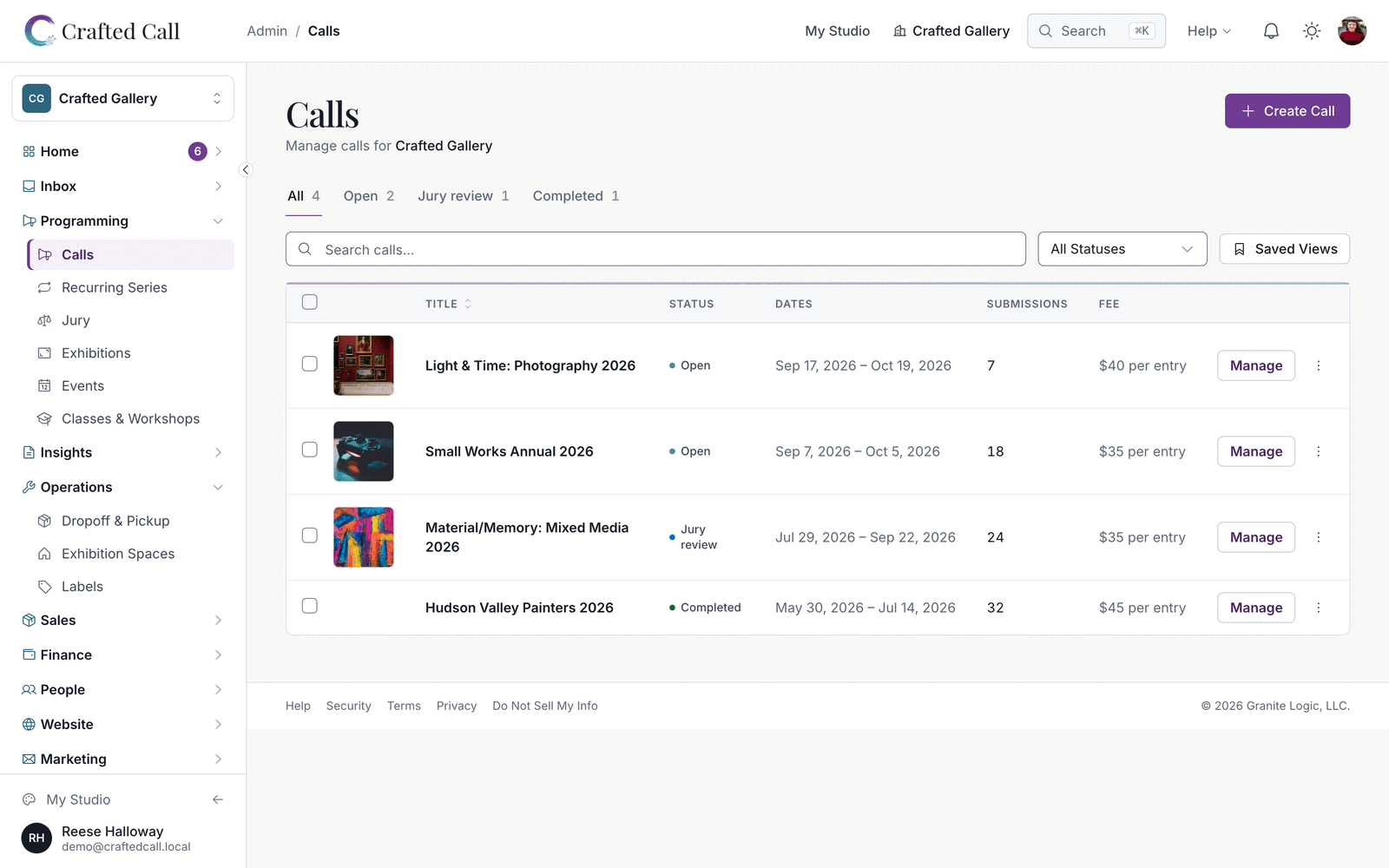
Crafted Call calls dashboard showing call statuses, submission counts, deadlines, and quick actions.

Page 4 of 13. Back to the latest announcements

Product announcement

Work in a cleaner, more colorful Crafted Call, choose jurors for each round, and reopen closed calls

Every page is redrawn around your gallery's work, with one clear button for what to do next, color that flags what needs you, and cards for short lists. Pick which jurors review each round, let jurors score in one tap on a phone or iPad, reopen a closed call from its Submissions page, and publish events with one clear button. Artists are paid on the price each work sold at and get fewer repeat emails, and the Custom Website setup is now $299, free when you choose Premier billed yearly.

LaunchedEveryone

Work in a cleaner, more colorful Crafted Call

Every page is redrawn to put your gallery's work first. Each screen has one filled button for the most important step and a visible button for each row's main action, and color now flags what needs you, with overdue items marked in amber with a clock. Short lists such as your catalog, exhibition spaces, signup forms and call templates show as cards.

LaunchedCall admins

Choose each round's jurors and score in one tap

Pick which of your call's jurors review a round in its Ready to Open preview, and choose what happens to works tied at the cutoff: advance them all, advance none, or pick them when you close the round. Jurors score 1 to 5 with one tap on a phone or iPad, every round shows the date scoring actually stops, and Juror Mode lets you walk through the jury as your juror will before you invite anyone. When you send decisions, the dialog names any works still undecided, and Set the Rest to Decline waits until you have accepted something.

LaunchedCall admins

Reopen a closed call from its Submissions page

The Call Actions menu on the Submissions page reopens a closed call and pauses or resumes an open one. When you move a closed call's deadline later, the editor offers to reopen submissions right away.

ExpandedEvent organizers

Publish events in one click and copy them onto new dates

A clear Publish button puts an event live. Ask Frida to copy an event onto a new date for the next run of a program, or to add sessions to a multi-week class, and she links you straight to the result. Search boxes across your admin lists keep pace with fast typing.

ExpandedExhibition teams

Pay artists on the sold price and extend their agreements

Payouts, sale emails and payment reminders use the wall price each sale was marked at, and your gallery's artwork page shows the price checkout charges. Extend an artist agreement's deadline and send it again, and exhibitions stay listed as current through their closing day, with wall-label QR codes opening each work's own page. Staff with the Programming or Exhibition Manager role can add works from inventory, import a CSV and install works. In the Inventory V2 pilot, a work that never arrives can leave with Remove from Show, and cancelling a show frees its works.

NoteGallery owners

Custom Website setup is now $299, free with yearly Premier

Setting up a Custom Website now costs $299 once, and the setup is free when you choose Premier billed yearly. The new price applies to new customers. The pricing page also starts from what you need: check the tools you want, see which plans include them, and estimate a year on each plan.

NoteGallery admins

Volunteers with Programming access can work on your calls

A volunteer you give Programming access can now open and edit your calls and see the Jury list. Submission rosters, notes and email stay with your staff.

QualityEveryone

Fewer repeat emails, and fixes across payments and forms

Artists get one Deadline Extended email a day and only while they still have a draft, a single reminder the day before a deadline, and no repeated confirmation attempts to an address that bounced. Receipts, order totals and refund limits show your gallery's currency, and pages no longer hang on Loading when a request is refused. Adding a subscriber explains itself when someone is already on your list, scheduled campaigns keep their send time, and on an annual plan your email campaign allowance resets every month. Public forms accept a click as soon as the page is ready, imported events show their cover photos to every visitor, and the next artist on a waitlist receives their acceptance letter when a place opens.

Product announcement

Review exhibition labels and exports for a whole call, offer your own medium terms, and a calmer jury

Correct what your wall labels and exports say for a whole call from one page, give artists your own medium terms as they enter work, and let your admins do almost everything an owner can. Jury review is calmer and clearer from the first score to the results, and event, class and membership sign-ups on your craftedcall.com address go straight through to payment.

LaunchedCall admins

Correct label and export text for a whole call

A new Labels & Export Review page on each call lists every piece your labels and exports include, with its photo beside its text. You can correct a piece's title, medium, size, artist name and wall text without changing what the artist submitted, and admins can update prices from the same page. Squarespace exports, the CSV Description and exhibition label sizes use what you corrected.

LaunchedGallery admins

Offer artists your own medium terms

Set your organization's medium suggestions in your settings, one term per line, and artists see your terms as they type a medium. The standard list now includes Archival Pigment Print, Gelatin Silver Print, C-Print, Lithograph and other common gallery terms. What an artist types is always kept as they typed it.

ExpandedGallery owners

Let your admins do almost everything an owner can

Organization admins can now manage tax settings, your logo, integrations, API keys and the roles of staff below admin, and can view Plan & Billing. Only an owner can delete the organization, cancel or change the subscription, connect the payout account, export all of your data or transfer ownership.

ExpandedCall admins

Run a calmer jury, from the first score to the results

Jurors see each piece's size in every view, read Artist 1 and Artist 2 in place of codes, and move between works with the arrow keys after saving. Your jury pages agree on where the jury stands, Results opens on the round you scored, and Advance appears once there is a next round and submissions have closed. Finishing a round early asks first, and Mark Decisions Sent waits for your notification date.

ExpandedPilot galleries

Set up Inventory V2 entry groups on their own page

On Inventory V2 calls, entry groups have their own page, each group a collapsible card with a plain summary of its limits, so Edit Call is much shorter. Squarespace export lists each piece for sale as its own product, works staff enter for an artist appear as pieces for labels, jurying and drop-off, and artists print one back label for each accepted piece. Galleries outside the Inventory V2 pilot see no change.

QualityEvent organizers

Take sign-ups on your craftedcall.com address

Event, class and membership sign-ups on your gallery's own craftedcall.com address go straight through to payment, and waitlist claim links open on your custom domain. A buyer who steps out of checkout can start again right away, desk bookings hold their seats, and virtual attendees receive their join link.

QualityMarketing teams

Welcome emails send exactly the content you write

Custom welcome emails arrive with the subject and content you write. A/B tests mail the rest of your list after 24 hours, campaign reports cover every send, and a subscriber you delete permanently stays deleted through later imports and syncs.

QualityEveryone

Quality work across admin pages, checkout and exports

Admin pages such as submission details, the calls list and event details load faster, and status labels, dates and amounts read as plain words in your time zone and currency. Artists can pay a single entry whenever the cart would take it, exported image links keep working, and paged lists show every item exactly once. Merging duplicate artist accounts keeps every submission and artwork, and receipts and notices from card payments retry on their own until they are sent.

Product announcement

Jury a call for art while it is still open, ask event registrants your own questions, and take rent by card outside the US

Your jurors can start scoring the day you open a round, and decision letters go out only when you send them. Events can ask registrants your own questions, artists can add several artworks from one pick, and tenants outside the US can pay rent by card. Inventory V2 is rolling out to pilot galleries, alongside improvements across exhibitions, marketing email, classes, payments and sign-in.

LaunchedCall admins

Score submissions while your call is still open

Jurors can start scoring as soon as you open a round, even while your call is still taking submissions. Late submissions, including free and fee-waived ones, and jurors who accept later join the open round on their own, and your call moves into jury review when submissions close. Triage notes save with each vote, and a Yes or No in triage records the juror's view while the decision stays yours.

LaunchedEvent organizers

Ask registrants your own questions

Add your own questions to an event's signup: short or long text, a dropdown, choices, a checkbox, a date, a number or a link. Answers show on the event's Registration tab and as their own columns in the CSV export, so you no longer read them out of a notes field.

LaunchedPilot galleries

Inventory V2 is rolling out to pilot galleries

Galleries in the Inventory V2 pilot can run a whole call from its screens: check works in, decide each piece, show and sell them, refund register sales and pay consignors. Each piece gets its own export row and wall label, and new calls start in Inventory V2 automatically. Galleries outside the pilot see no change.

ExpandedRental administrators

Take rent by card outside the US

Tenants outside the US can pay rent by card: the card form appears, 3D Secure checks complete, and a declined card can be swapped for another on the spot. Tenants can turn on autopay from their rental portal once a bank is linked, and renewing a lease keeps its tenants, bank, autopay and terms without billing the deposit again. US leases are billed from the day they start.

ExpandedArtists

Add several artworks from one pick

When you pick several images in Add Artwork, you can say whether they are photos of one artwork or separate artworks. You can add up to five separate artworks in one go, each with its own title.

NoteCall admins

Decision letters go out only when you send them

Changing a submission's status no longer emails the artist. Decision letters go out when you send them, a letter you hold back stays held until you change that decision, and you can resend a letter. Acceptance letters on pay-on-acceptance calls always carry the pay button.

NoteGallery admins

The payments CSV now matches your Payments page

The payments CSV's Net Amount now deducts fees, so it matches Net to Gallery on the Payments page. Its Call Title column is now Call / Event, and event registration rows show the buyer and the event instead of N/A.

QualityEveryone

Quality work across classes, exhibitions, email and payments

One class registration covers every session, and check-in, My Classes, emails, calendar files and refunds follow the class's real sessions. You can mark batch payouts paid, wall-label QR codes open the right show, including labels already printed, and floor-plan edits keep every move. Large lists send in minutes, and open rates leave out Apple Mail's automatic opens. A card the payment processor turns down releases the cart at once, you can download a call activation's receipt from the Payments page, and public artwork images load at the size of the screen. Donors, event guests and volunteers who never set a password can set one by email.

Product announcement

Export jury results as you see them, show dates in your country's format, and refund every entry when you cancel a call

Export the jury decision list exactly as it appears on screen, read dates in your own country's format, and keep your Premier site free of our branding. Cancelling a call refunds every entry automatically, and blind review keeps artists anonymous until you reveal them.

LaunchedCall admins

Export jury results as the list you see

The Export button on a call's jury Results tab now asks what you want. Decision list downloads exactly the rows on screen, with the same search, status filter and sort, so the file matches what your panel just reviewed. Scoring report is the full score file you had before.

ExpandedGallery admins

Read dates in your own country's format

Dates now follow your organization's locale across your admin pages, the emails you send, and your public call, event and site pages. A gallery in Australia or New Zealand reads 30 Sep 2026 instead of Sep 30, 2026.

ExpandedGallery owners

Keep Crafted Call branding off your Premier site

White label, included with Premier, now removes Crafted Call branding from your site's header, footer and mobile menu, from your gallery widget, and from the embed code you copy. The badge in your campaign emails follows the same rule, so it can be removed on Premier.

ExpandedMarketing teams

Use your exact brand colour

A brand colour with low contrast saves with a warning that shows its contrast ratio. Wherever your colour fills a button in your emails or on your site, the text on it switches to black or white so it stays readable.

NoteGalleries in Australia & New Zealand

Australia and New Zealand: charges quoted before GST

For organizations in Australia and New Zealand, the per-application platform charge is now quoted excluding GST on your billing page and when you publish, and no GST is added to your monthly invoice today. As in Australia, organizations in New Zealand pay the platform charge themselves rather than asking artists to cover it.

QualityCall admins

Cancelling a call refunds every entry

When you cancel a call, every paid entry is refunded, including each one an artist paid for through the cart, and each refund goes through your organization's own Stripe account. If any refund does not go through, cancel tells you. A cart payment that covered an entry the artist had already paid for another way, or had removed from the cart, is refunded for that entry automatically.

QualityCall admins

Blind review keeps artists anonymous until you reveal them

New jury rounds follow your call's blind review setting, artist narratives stay hidden from jurors, and you reveal identities once judging finishes. Your preview of a round shows exactly what jurors see. A juror who declares a conflict steps back from that artist's work, and their scores for it are left out of your results.

QualityEveryone

Quality work across your site, checkout and events

Membership sign-up links, the Join button and scan-to-buy QR codes take visitors straight to checkout on every gallery site, and guest buyers land on their thank-you page. An artist can choose the sliding-scale fee level your call offers whether they pay for one entry or from their cart, and an artist who backs out of a payment can cancel it and edit their cart straight away. Call listings include the platform charge when artists pay it, and comped and manually added guests can be checked in at the door. Pages load faster, refunds and chargebacks settle to the right totals whatever order they arrive in, and a save that cannot finish tells you why.

Product announcement

Publish calls for artists free on every plan, run memberships and newsletters on Core, and set up each jury round

Publishing a call now costs nothing up front on any plan: your organization pays a small flat charge for each completed application on one monthly invoice, or artists pay it when they apply. Core now includes memberships and newsletters, and you can set up exactly how each jury round is scored and shared out.

LaunchedCall admins

Publish a call for $0 on every plan

The activation fee is gone. Build the call, choose when it goes public, and publish. If your organization will pay the platform charge, you save a card at that moment; nothing is charged until applications arrive.

LaunchedMembership admins

Run your member organization on Core

Core now includes memberships and newsletters. Set up member tiers, take renewals and email your members from the plan you already have, at US$19 a month or US$199 a year. Organizations already on Core have both switched on, with nothing to do.

LaunchedCall admins

Set up how each jury round is scored and shared out

For each round you can choose triage votes or rubric criteria, decide how work is split across jurors, set the minimum number of reviews per work and the reminder schedule, and see who will review what before the round opens. Jurors add work to Compare and Shortlist with a tap, first-visit tips appear one at a time, and jurors stay on the panel's discussion roster as they finish each batch.

ExpandedGallery owners

See what a plan costs as a share of your revenue

The cost estimator on the pricing page now works out the entry-fee and sales revenue your numbers imply and shows each plan's yearly cost as a percentage of it. It also shows what the flat platform charge comes to as a share of one entry fee, from Pay as you go to Premier, so you can compare it with a platform that takes a percentage of every fee.

NoteGallery owners

US$1 per completed application on Pay as you go

The Free plan is now called Pay as you go. Each completed application carries a flat platform charge of US$1, whatever the entry fee. Each artwork an artist enters is its own application. Core is US$0.65 per application, Studio and Gallery US$0.50, and Premier US$0.25. Drafts, abandoned entries and fully waived applications are never charged. Calls you published before today keep the pricing they were published under. After a subscription ends, new applications are charged at the Pay-as-you-go rate.

NoteGallery owners

Choose who pays: your organization or your artists

When you publish, decide who pays the platform charge for that call. Your organization receives one invoice a month, itemised by call and charged to the card on file, with no minimum bill; it is raised on the first of the following month. Or artists pay it when they apply, with card processing included and the total shown before they start; then your organization owes nothing for that call. Artists entering an organization-paid free call see no payment step at all. Artists can be asked only on calls priced in US dollars, and not yet for organizations in Australia. An entry priced above $0 but below the charge has the artist pay it, with the total shown before paying.

NoteGallery admins

Seven days to settle an invoice we could not collect

If a monthly invoice cannot be charged, we tell the organization's owners and admins and give you seven days from that first failed collection. Nothing changes during them, and a later retry does not restart the clock. After seven days, four things stop until the balance is paid: publishing a new call, creating an exhibition, duplicating an exhibition, and exporting submissions in bulk. Live calls keep accepting artists throughout, and signing in, reading your calls and submissions, jury review, your billing pages and updating your card are never restricted. Settle the invoice and the four come back on their own.

QualityEveryone

Quality work across billing, reminders and staff roles

Artists can redeem a free-submission credit against an entry still in their cart, and draft reminders greet each artist by name with your call's deadline. Staff with an Exhibition Manager, Programming, Commerce or Finance role reach every part of the admin their role covers. The billing page shows this month's completed applications by call, the next invoice date and every usage invoice.

Product announcement

Set default submission fee waivers for every new call, publish drafts from the header, and keep artists' PDF filenames

Set your organization's fee waivers once and every new call that charges a fee starts with them. Publish Call sits right in a draft's header, PDF answers download under the artist's own filename, and a duplicated call keeps its own images.

LaunchedGallery admins

Set default fee waivers once for every new call

Under New call defaults in your organization settings you can now keep a list of fee waivers, such as members or volunteers submitting free, or a waiver by age. Every new call that charges a fee starts with that list, whether you create it in the call builder or through the API, and you can still change the waivers on any call.

ExpandedGallery admins

Publish a draft from its own page

On a draft call's page, Publish Call and Schedule publishing now sit in the header next to Call actions instead of inside that menu, so the one step that makes a call live is the first thing you see.

QualityCall admins

PDF answers download under the artist's filename

A PDF an artist attaches to one of your call's questions downloads with the name the artist gave it.

QualityCall admins

Duplicated calls keep their own images

When you duplicate a call, the images in its description, guidelines, requirements and content blocks are copied along with it, so each call keeps its own and editing one leaves the other untouched.

QualityCall admins

Withdrawing a juror's conflict gives their reviews back

When a juror declares a conflict of interest with an artist, their reviews of that artist's work are set aside. If the conflict is withdrawn, those reviews return to the juror's queue, and only those.